
Active Directory vs Azure AD | Everything you need to know
Compare Active Directory vs Azure AD (Microsoft Entra ID). Explore pricing, setup, hybrid solutions & find the best identity management for your business in India.
30
Jan
Active Directory vs Azure AD | Everything you need to know
in this article
- Introduction
- Active Directory vs Azure AD: The Core Comparison
- Pricing Comparison: Active Directory vs Azure AD
- Setup and Implementation
- Hybrid Identity: Combining Both Worlds
- Which Solution is Right for Your Organization?
- BM Infotrade: Your Trusted Microsoft Identity Solutions Partner in India
- Frequently Asked Questions (FAQs)
- Conclusion
Introduction
In today's rapidly evolving digital landscape, identity and access management (IAM) has become the cornerstone of organizational security and efficiency. As businesses transition between on-premises infrastructure and cloud-based solutions, understanding the differences between Active Directory (AD) and Azure Active Directory (Azure AD, now known as Microsoft Entra ID) is crucial for making informed decisions about your IT infrastructure.
This comprehensive guide explores the key differences, similarities, use cases, and implementation considerations for both platforms, helping you determine which solution best fits your organization's needs—or whether a hybrid approach combining both technologies is the optimal choice.
Active Directory vs Azure AD: The Core Comparison
What is Active Directory?
Active Directory (AD) is Microsoft's on-premises directory service that manages users, computers, and other resources within a network domain. It operates on Windows Server and uses protocols like LDAP (Lightweight Directory Access Protocol), Kerberos, and NTLM for authentication and authorization.
Key Features of Active Directory:
- Centralized domain management for on-premises networks
- Group Policy Objects (GPO) for device and user configuration management
- Integration with Windows Server infrastructure
- Support for LDAP-based applications
- Organizational Units (OUs) for hierarchical resource organization
- Native support for file sharing, print services, and network resources
What is Azure AD (Microsoft Entra ID)?
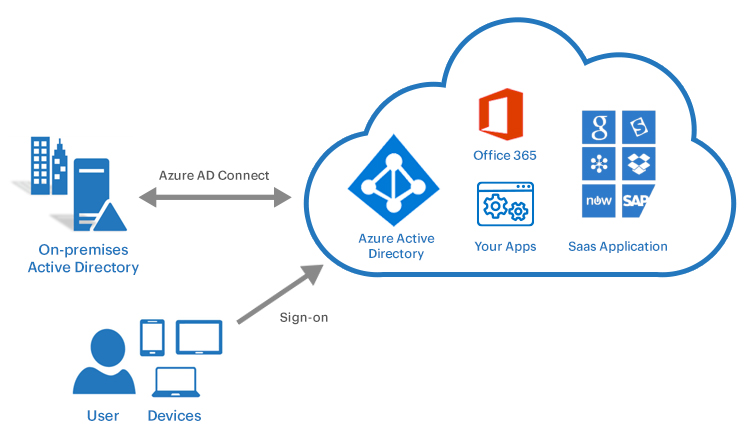
Azure Active Directory, recently rebranded as Microsoft Entra ID, is Microsoft's cloud-based identity and access management service. It provides authentication and authorization for cloud applications, including Microsoft 365, Azure services, and thousands of SaaS applications.
Key Features of Azure AD:
- Cloud-native identity management platform
- Single Sign-On (SSO) for cloud and web applications
- Multi-factor Authentication (MFA) and Conditional Access policies
- Identity protection with AI-driven risk detection
- Application proxy for secure remote access
- B2B and B2C identity scenarios
- Integration with thousands of pre-configured SaaS applications
Primary Differences Between Active Directory and Azure AD
1. Architecture and Deployment
Active Directory operates on a hierarchical structure with domains, trees, and forests, requiring physical or virtual servers within your network infrastructure. Azure AD uses a flat structure optimized for cloud services, operating as a managed service without the need for infrastructure management.
2. Authentication Protocols
Active Directory primarily uses Kerberos and NTLM for authentication, protocols designed for on-premises networks. Azure AD leverages modern authentication protocols including SAML, OAuth 2.0, OpenID Connect, and WS-Federation, which are optimized for internet-based applications and mobile devices.
3. Device Management
With Active Directory, you can join Windows devices to the domain and manage them through Group Policy Objects. Azure AD supports device registration and join capabilities for Windows 10/11, iOS, Android, and macOS devices, with management typically handled through Microsoft Intune or other Mobile Device Management (MDM) solutions.
4. Application Integration
Active Directory excels at managing on-premises Windows applications and legacy systems that rely on LDAP or Kerberos authentication. Azure AD is designed for cloud and modern web applications, offering pre-integrated connectors for thousands of SaaS applications and supporting modern authentication standards.
5. Access Management
Traditional Active Directory uses domain-based trust relationships and security groups to control access to resources. Azure AD provides Conditional Access policies that evaluate real-time signals including user location, device compliance status, risk level, and application sensitivity to make dynamic access decisions.
6. Scalability and Maintenance
Managing Active Directory requires dedicated IT resources for server maintenance, updates, backups, and disaster recovery planning. Azure AD operates as a fully managed service with built-in redundancy, automatic updates, and global availability, reducing administrative overhead.
Pricing Comparison: Active Directory vs Azure AD
Active Directory Pricing
The cost structure for Active Directory includes several components:
Infrastructure Costs:
- Windows Server licenses (starting from ₹35,000 to ₹1,50,000+ per server depending on edition)
- Physical or virtual server hardware
- Storage and backup infrastructure
- Network infrastructure requirements
Operational Costs:
- IT staff for management and maintenance
- Electricity and cooling for on-premises servers
- Regular updates and security patches
- Disaster recovery and business continuity planning
Typical Total Cost: For a medium-sized organization with 200-500 users, the initial setup can range from ₹5,00,000 to ₹15,00,000, with ongoing annual operational costs of ₹3,00,000 to ₹8,00,000.
Azure AD (Microsoft Entra ID) Pricing
![Azure AD Basic versus Premium - Office 365 Essentials [Book]](https://www.oreilly.com/api/v2/epubs/urn:orm:book:9781788622073/files/assets/250ab83f-6105-4b14-a576-5e688e09b7ec.png)
Azure AD offers a tiered pricing model based on features and user count:
Azure AD Free:
- Included with Microsoft 365 subscriptions
- Basic user and group management
- Single Sign-On for unlimited cloud apps
- User provisioning and self-service password reset
Azure AD Premium P1:
- Approximately ₹500-600 per user/month
- Conditional Access policies
- Dynamic groups
- Self-service group management
- Cloud app discovery
- Microsoft Identity Manager integration
Azure AD Premium P2:
- Approximately ₹750-900 per user/month
- Identity Protection with risk-based policies
- Privileged Identity Management (PIM)
- Access reviews
- Entitlement management
Microsoft Entra ID Governance:
- Additional ₹600-700 per user/month
- Advanced identity governance capabilities
- Lifecycle workflows
- Access certifications
Cost Advantage: For organizations already using Microsoft 365, Azure AD Free is included, making it extremely cost-effective. Even with Premium features, the predictable per-user monthly cost often results in lower total cost of ownership compared to on-premises Active Directory, especially when factoring in infrastructure and operational expenses.
Setup and Implementation
Setting Up Active Directory
Prerequisites:
- Windows Server installation (2016, 2019, 2022, or later)
- Proper network infrastructure with DNS
- Static IP addresses for domain controllers
- Adequate server hardware specifications
Implementation Steps:
The Active Directory setup process begins with installing the Active Directory Domain Services role on Windows Server. After installation, you promote the server to a domain controller, creating a new forest and domain or adding it to an existing infrastructure. Configuration includes setting up DNS services, creating Organizational Units for logical resource organization, configuring Group Policy Objects for security and configuration management, and establishing user accounts and security groups.
Additional considerations include implementing at least two domain controllers for redundancy, configuring regular backup procedures, planning your OU structure carefully, documenting your domain architecture, and implementing appropriate security hardening measures.
Timeline: A basic Active Directory deployment typically takes 1-2 weeks for small organizations, while enterprise deployments can take 4-8 weeks depending on complexity.
Setting Up Azure AD
Prerequisites:
- Microsoft 365 or Azure subscription
- Verified domain name
- Global Administrator access
- Planning for hybrid identity if connecting to on-premises AD
Implementation Steps:
Azure AD setup is significantly more straightforward than traditional Active Directory. You begin by creating an Azure AD tenant through the Azure portal, then verify your custom domain name. User accounts can be created directly in the cloud or synchronized from on-premises Active Directory using Azure AD Connect.
Key configuration tasks include enabling Multi-Factor Authentication for security, configuring Conditional Access policies for context-aware access control, setting up Single Sign-On for integrated applications, implementing identity protection features, and configuring device management settings if using Intune.
For hybrid scenarios where you have on-premises Active Directory, Azure AD Connect provides seamless synchronization, enabling users to access both on-premises and cloud resources with a single identity.
Timeline: Basic Azure AD setup can be completed in hours to a few days. Hybrid deployments with Azure AD Connect typically require 1-2 weeks for proper planning and implementation.
Hybrid Identity: Combining Both Worlds
Many organizations don't need to choose between Active Directory and Azure AD—they can leverage both through a hybrid identity approach. Azure AD Connect synchronizes on-premises Active Directory identities to Azure AD, enabling users to access both on-premises and cloud resources with a single set of credentials.
Benefits of Hybrid Identity:
- Maintain existing on-premises investments while adopting cloud services
- Single sign-on across on-premises and cloud applications
- Consistent identity management across environments
- Gradual migration path to the cloud
- Support for legacy applications requiring on-premises AD
Common Hybrid Scenarios:
- Organizations using Microsoft 365 with on-premises infrastructure
- Companies with legacy applications that require Active Directory
- Businesses in regulated industries maintaining on-premises data centers
- Enterprises undergoing gradual cloud migration
Which Solution is Right for Your Organization?
Choose Active Directory if:
- Your infrastructure is primarily on-premises with no immediate cloud plans
- You heavily rely on Group Policy for device management
- You have significant investments in LDAP-based applications
- Regulatory requirements mandate on-premises identity management
- You need fine-grained control over domain controllers and infrastructure
Choose Azure AD if:
- You're adopting cloud-first or cloud-only strategy
- Your workforce is mobile and distributed
- You primarily use SaaS applications and Microsoft 365
- You want to minimize infrastructure management overhead
- You need modern security features like Conditional Access and Identity Protection
Choose Hybrid Identity if:
- You have both on-premises and cloud workloads
- You're gradually migrating to the cloud
- You need to support legacy applications alongside modern cloud apps
- You want flexibility to move workloads between environments
- You have users accessing resources across multiple locations
BM Infotrade: Your Trusted Microsoft Identity Solutions Partner in India
Implementing and managing identity infrastructure requires expertise, planning, and ongoing support. BM Infotrade stands as one of India's most trusted Microsoft solutions partners, specializing in Active Directory, Azure AD (Microsoft Entra ID), and hybrid identity deployments.
Why Choose BM Infotrade?
Deep Microsoft Expertise: Our team consists of Microsoft-certified professionals with extensive experience in identity and access management solutions. We stay current with the latest Microsoft technologies and best practices to deliver cutting-edge solutions.
Comprehensive Services: BM Infotrade offers end-to-end services including assessment and planning, architecture design and implementation, migration from on-premises to cloud or hybrid models, security optimization and compliance, ongoing management and support, and training for your IT teams.
Proven Track Record: With successful deployments across enterprises, mid-market companies, and government organizations throughout India, BM Infotrade has established itself as a reliable partner for identity transformation projects.
Local Presence, Global Standards: As an India-based partner, we understand local business requirements, regulatory compliance needs, and budget considerations while delivering solutions that meet international security standards.
Customized Solutions: We recognize that every organization is unique. Our approach begins with understanding your specific requirements, existing infrastructure, and business objectives to design tailored solutions that deliver maximum value.
Our Service Offerings
BM Infotrade provides comprehensive identity management services including Active Directory design and deployment with high availability and disaster recovery, Azure AD implementation and optimization, hybrid identity solutions using Azure AD Connect, migration services from legacy systems to modern identity platforms, security assessments and hardening, conditional access and multi-factor authentication setup, identity governance and privileged access management, and 24/7 monitoring and support services.
Get Started with BM Infotrade
Whether you're planning a new Active Directory deployment, migrating to Azure AD, or implementing a hybrid identity solution, BM Infotrade has the expertise and experience to guide you through every step of your identity transformation journey.
Contact BM Infotrade today to schedule a consultation with our identity management experts. Let us help you build a secure, scalable, and efficient identity infrastructure that supports your business objectives and prepares your organization for the future of work.
Frequently Asked Questions (FAQs)
1. Can Azure AD completely replace Active Directory?
For organizations that are fully cloud-based and don't have legacy on-premises applications, Azure AD can serve as a complete identity solution. However, many organizations still require Active Directory for specific scenarios such as Group Policy management for Windows devices, LDAP-based legacy applications, on-premises file servers and print services, or applications that require Kerberos or NTLM authentication. In such cases, a hybrid approach combining both Active Directory and Azure AD provides the best of both worlds.
2. What is the difference between Azure AD Join and Domain Join?
Domain Join connects a Windows device to an on-premises Active Directory domain, allowing centralized management through Group Policy and access to on-premises resources. Azure AD Join connects a device directly to Azure AD without requiring on-premises Active Directory, enabling cloud-based management through Intune or other MDM solutions, single sign-on to cloud applications, and support for Windows Hello for Business. Azure AD Join is ideal for cloud-first organizations and remote workers who primarily access cloud resources.
3. How does password synchronization work in hybrid environments?
Azure AD Connect provides password hash synchronization, which synchronizes a hash of the user's password from on-premises Active Directory to Azure AD. This enables users to use the same password for both on-premises and cloud resources. Importantly, the actual password is never transmitted to the cloud—only a hash of the hash is synchronized, ensuring security. Alternatively, organizations can implement Pass-through Authentication or federate with AD FS for different authentication models.
4. What are the bandwidth and connectivity requirements for Azure AD?
Azure AD operates over standard internet connections and doesn't require dedicated circuits. For Azure AD Connect synchronization, minimal bandwidth is needed—typically just a few megabits per second for most organizations. The service is designed to work efficiently even with standard broadband connections. However, for optimal user experience, especially with features like Single Sign-On and Conditional Access, a stable internet connection with low latency is recommended.
5. How long does it take to migrate from Active Directory to Azure AD?
The migration timeline varies significantly based on your organization's size, complexity, and chosen approach. A small organization with straightforward requirements might complete a cloud-only migration in 2-4 weeks. Medium to large enterprises typically require 2-6 months for a complete hybrid identity implementation, including planning, pilot testing, and phased rollout. The process involves assessment and planning, Azure AD Connect deployment, pilot testing with select user groups, phased migration of users and applications, testing and validation, and end-user training and support. Working with an experienced partner like BM Infotrade can significantly streamline this process and reduce risks.
6. What happens if my internet connection goes down with Azure AD?
Azure AD is a cloud service, so internet connectivity is required for authentication to cloud resources. However, several measures mitigate this risk. For hybrid environments, users can still authenticate to on-premises resources using Active Directory even without internet access. Windows devices cache credentials, allowing users to sign in to their devices even when offline. Azure AD supports seamless single sign-on, which can leverage cached tokens for a period. Many applications support offline modes. For business-critical scenarios, organizations should implement redundant internet connections and consider hybrid identity architectures that maintain on-premises authentication capabilities as a fallback.
Conclusion
The choice between Active Directory and Azure AD is not necessarily an either-or decision. Understanding the strengths, limitations, and ideal use cases for each platform enables you to design an identity infrastructure that aligns with your organization's current needs and future direction.
Active Directory remains a robust solution for on-premises environments with traditional infrastructure, while Azure AD represents the future of cloud-based identity management with modern security features and seamless integration with cloud services. For many organizations, a hybrid approach provides the flexibility to leverage both platforms effectively.
As you navigate your identity management journey, partnering with experienced professionals can make the difference between a smooth transformation and a challenging implementation. BM Infotrade brings the expertise, experience, and local knowledge to help Indian organizations successfully implement and optimize their identity infrastructure.
Ready to transform your identity management? Contact BM Infotrade today and take the first step toward a more secure, efficient, and modern identity infrastructure.






Anshul Goyal
Group BDM at B M Infotrade | 11+ years Experience | Business Consultancy | Providing solutions in Cyber Security, Data Analytics, Cloud Computing, Digitization, Data and AI | IT Sales Leader